Washing machine symbols can look confusing when you use a new appliance or try an unfamiliar wash cycle. One icon might represent temperature, another controls spin speed, and a third indicates a special cleaning program. Understanding these symbols helps you wash clothes correctly, protect delicate fabrics, and get better results from every load.
This guide explains the most common washing machine symbols and meanings, including wash programs, temperature settings, spin options, detergent drawer symbols, and warning lights. You’ll also learn how to choose the right cycle for different fabrics and what to do when a warning symbol appears.
Keep in mind that symbols can vary by brand and model. Your machine’s control panel may include options that other machines don’t have. Always follow the instructions supplied with your appliance when a symbol or setting is unclear.
Common Washing Machine Symbols and Their Meanings
Most washing machines use simple pictures to show what each button or setting does. Some symbols represent complete wash programs, while others adjust how the machine cleans, rinses, or spins your clothes.
The following table explains common washing machine icons and what they usually mean.
| Washing Machine Symbol | Meaning | What It Does |
| Power symbol | On/Off | Turns the washing machine on or off |
| Start/Pause symbol | Start or pause | Starts a wash cycle or temporarily stops it |
| Tub with water | Wash or rinse | Indicates a washing or rinsing stage |
| Cotton plant | Cotton cycle | Washes durable cotton fabrics |
| Feather | Delicate cycle | Uses gentler washing action for delicate items |
| Ball of wool | Wool cycle | Provides a gentler wash for suitable wool garments |
| Clock | Time or delay | Shows remaining time or a delayed start |
| Spiral | Spin cycle | Spins clothes to remove excess water |
| Water droplets | Water-related setting | May indicate rinsing, water level, or water use |
| Tub with an arrow | Drain | Pumps water out of the drum |
| Lock or padlock | Child lock or door lock | Indicates a locked control panel or door |
| Iron | Easy-iron setting | Helps reduce wrinkles on compatible fabrics |
| Leaf or eco symbol | Eco wash | Uses an energy-conscious washing program |
| Thermometer | Temperature | Displays or adjusts the wash temperature |
| Drum with a star or sparkle | Drum cleaning | Runs a maintenance cycle to clean the drum |
| Tap symbol | Water supply warning | May indicate a water inlet or supply problem |
| Wi-Fi symbol | Smart connectivity | Indicates a connected or remote-control feature |
Important: These descriptions are general. The exact meaning depends on your washing machine’s manufacturer and model.
What Do the Different Washing Machine Programs Mean?
The program dial determines how your washing machine handles a load. Each cycle uses a particular combination of washing action, water temperature, rinsing, and spinning.
Choosing the correct program can help remove dirt without damaging your clothes.
Cotton Symbol
The cotton symbol usually looks like a cotton plant or cotton boll. It represents a cycle designed for durable cotton items, such as towels, T-shirts, bedsheets, and cotton underwear.
Cotton programs often use stronger drum movements than delicate cycles. Depending on the machine, they may also allow higher temperatures and faster spin speeds.
Choose this cycle for sturdy cotton garments when the care labels permit it. Use a lower temperature for everyday clothes that aren’t heavily soiled.
Eco Wash Symbol
The Eco symbol often appears as a leaf or another nature-inspired icon. It identifies an energy-saving washing program.
An eco cycle usually reduces energy consumption by adjusting the temperature, washing time, and other settings. Some eco programs take longer than standard cycles because they use energy more efficiently.
Use the eco program for normally soiled clothes that can handle the selected settings. A longer cycle doesn’t automatically mean the machine uses more energy.
Synthetics Symbol
The synthetics symbol may resemble a flask, a chemical container, or a stylized fabric icon. Its appearance varies between manufacturers.
This program is intended for synthetic fabrics, including polyester and some blended materials. It generally uses gentler washing action than a standard cotton cycle.
Choose this setting for suitable synthetic shirts, trousers, sportswear, and blended garments. Check the care label before washing items that contain special coatings or elastic fibers.
Delicate Wash Symbol
The delicate wash symbol often looks like a feather or a gentle fabric icon. It indicates a cycle designed for clothes that need extra care.
Delicate programs typically use reduced agitation and may limit the spin speed. They’re suitable for certain lightweight fabrics, lingerie, and garments that could stretch or lose their shape during a vigorous wash.
Always check the care label first. Some delicate garments require hand washing or professional cleaning rather than machine washing.
Wool Wash Symbol
The wool symbol usually looks like a ball of yarn. It identifies a gentle cycle intended for machine-washable wool garments.
Wool fibers can shrink, stretch, or become felted when exposed to unsuitable heat and movement. Wool programs help reduce these risks by using gentler washing action and controlled temperatures.
Use this cycle only when the garment’s care label allows machine washing. Select an appropriate wool detergent when recommended.
Quick Wash Symbol
The quick-wash symbol often includes a clock or a short time indicator. It represents a shorter washing program.
A quick wash cycle works best for small loads of lightly soiled clothes. It may use less time and less water than a full cycle, depending on the machine.
Avoid overloading the drum. Quick cycles may not clean heavily stained garments or large loads as effectively as longer programs.
Mixed Load Symbol
The mixed-load program is designed for a combination of compatible fabrics. It can be useful when you have everyday garments made from cotton and synthetic blends.
This setting aims to balance cleaning performance with fabric protection. However, you should still separate clothes by color, soil level, and care requirements.
Don’t combine items that require very different temperatures or washing methods simply because the machine offers a mixed-load cycle.
Intensive Wash Symbol
An intensive or heavy-duty program is designed for suitable garments with heavier soil. It may use a longer wash time or more vigorous washing action.
This setting can help clean sturdy work clothes, towels, and other durable items. It isn’t automatically suitable for every stained garment.
Check the fabric label and pretreat stubborn stains when appropriate. Excessive heat or aggressive washing can damage some fabrics even when they’re dirty.
Prewash Symbol
The prewash symbol may look like a tub marked with the number one or the letter “I.” Some machines use a separate prewash icon.
A prewash adds an initial cleaning stage before the main wash. It can help loosen dirt from heavily soiled clothing.
You may need to add detergent to the prewash compartment when using this function. Check the detergent drawer markings and your machine’s instructions.
Prewash is usually unnecessary for lightly worn clothes.
Rinse and Spin Symbol
A rinse-and-spin program rinses clothes with water and then spins them to remove excess moisture. Some machines offer rinse and spin as separate functions.
Use rinse and spin when clothes need an additional rinse or when you want to remove detergent residue from a suitable load.
This setting can also help after hand washing garments that are safe to machine-spin. Select a gentle spin speed for delicate items.
Drain Symbol
The drain symbol often resembles a tub with an arrow pointing downward or outward.
The drain cycle removes water from the washing machine without necessarily running a full wash program. You may need it if water remains inside the drum or if you want to remove water before moving a load.
If the machine won’t drain, check the troubleshooting instructions for your model. A blocked filter or drainage hose may be responsible.
Drum Clean Symbol
A drum-cleaning symbol may show a washing drum with sparkles, stars, or a cleaning indicator.
The drum clean cycle helps remove detergent residue, dirt, and buildup from the inside of the machine. Regular maintenance can also help reduce unpleasant odors.
Run the cycle according to the manufacturer’s instructions. Many machines recommend running it with an empty drum, and some require a specific cleaning product.
Don’t put ordinary laundry in the drum unless your appliance’s instructions explicitly allow it.
Washing Machine Temperature Symbols Explained
Temperature settings affect cleaning performance, energy consumption, and fabric care. Most machines display temperatures in degrees Celsius, although some models may use different indicators.
The correct setting depends on the fabric, the garment’s care label, and how dirty the clothes are.
| Temperature | Common Uses | What to Consider |
| 20°C | Lightly soiled everyday clothes | Can reduce energy use when suitable detergent and cycle settings are used |
| 30°C | Colored clothes and many delicate items | Helps protect some fabrics and colors |
| 40°C | Many everyday garments | Provides a balance between cleaning and fabric care |
| 60°C | Suitable towels, bedding, and certain durable items | Use only when the care labels permit it |
| 90–95°C | Certain heat-resistant white cotton items | Available on some machines; unsuitable for many modern fabrics |
These temperatures are general examples, not universal rules. A garment’s care label should guide your choice.
What Does 20°C Mean on a Washing Machine?
The 20°C setting uses a relatively cool wash. It can work well for lightly soiled clothing when the detergent is suitable for low-temperature washing.
Cooler water may help preserve certain colors and reduce energy consumption. However, heavily soiled items may need pretreatment or a different cycle.
What Does 30°C Mean?
A 30°C wash is a common choice for everyday colored clothing and many garments that need gentle care.
It can help reduce the risk of color fading and shrinkage compared with hotter washing. Still, fabric type and dye quality matter.
What Does 40°C Mean?
The 40°C setting is widely used for everyday laundry. It can suit many cotton and synthetic garments when their care labels allow it.
It isn’t the right temperature for every load. Some fabrics need cooler water, while certain washable items may require a hotter cycle.
What Does 60°C Mean?
A 60°C wash may be appropriate for certain durable towels, bedding, and other heat-resistant items.
Higher temperatures can help with some cleaning tasks, but they also use more energy and may damage unsuitable fabrics. Follow the garment label and the washing machine’s instructions.
What Do the Temperature Dots on Clothing Labels Mean?
Clothing care labels sometimes use dots instead of printed temperatures. These dots indicate the maximum recommended washing temperature for the garment.
The number and placement of dots depend on the care-label system. Don’t confuse garment care symbols with the temperature icons on your washing machine.
When a label provides a specific temperature, follow that instruction rather than guessing from the garment’s color or material.
Washing Machine Spin Symbols and RPM Settings
The spin symbol usually resembles a spiral. It represents the stage when the drum rotates to remove water from clothes.
Spin speed is measured in revolutions per minute (RPM). A higher RPM generally removes more moisture, while a lower speed is often gentler on delicate fabrics.
| Spin Speed | Typical Use | Main Consideration |
| 400 RPM | Delicate or easily creased items | Leaves clothes wetter |
| 800 RPM | Many delicate or everyday garments | Offers a moderate spin |
| 1,000 RPM | Everyday laundry | Balances moisture removal and fabric care |
| 1,200 RPM | Suitable towels and sturdy garments | Removes more water from compatible loads |
| 1,400 RPM | Durable fabrics that permit high-speed spinning | May increase creasing or stress on some items |
These are general guidelines. Not every washing machine offers all these speeds, and not every garment can tolerate a high-speed spin.
What Does No Spin Mean?
The no-spin setting prevents the machine from running its normal final spin. Clothes remain wetter than they would after a standard cycle.
This setting can help protect some delicate garments, but it may leave a considerable amount of water in the load.
What Does Rinse Hold Mean?
Rinse hold keeps clothes in the water after the rinse stage instead of immediately completing the final spin. The precise behavior depends on the machine.
It can help prevent creasing when you can’t remove clothes immediately. You’ll generally need to run a drain or spin program afterward.
What Does Reduced Spin Mean?
Reduced spin lowers the final spin speed. It can be useful for garments that crease easily or require gentler handling.
Choose the speed according to the care label rather than automatically selecting the highest setting.
Washing Machine Water Symbols

Water-related symbols can indicate rinsing, water supply, water level, or water-saving functions. Their meanings differ between manufacturers.
Water Droplet Symbol
A water droplet may represent a water-related option, but it doesn’t have one universal meaning.
Depending on the model, it could indicate extra rinsing, water usage, or another wash function. Check the printed label beside the icon or consult the machine’s instructions.
Extra Rinse Symbol
The extra-rinse function adds another rinsing stage to a program. It can help remove remaining detergent from suitable loads.
This option may be useful for bulky laundry or when you need additional rinsing. It can increase water consumption and program duration.
Water Level Symbol
Some machines display water-level indicators or water-saving options. Modern automatic washers often adjust water use according to the load and selected program.
Don’t assume that every water symbol lets you manually control the water level. The function depends on the appliance.
Tap Symbol
A tap icon commonly indicates a water-supply issue. It may appear when the machine can’t fill properly.
Possible causes include a closed water tap, a kinked inlet hose, or a blocked inlet filter. Follow your machine’s safety instructions before inspecting any connections.
If the warning remains after you check the permitted items, contact a qualified service technician.
Washing Machine Control Panel Symbols
The control panel contains buttons and indicators for starting a wash, adjusting settings, and monitoring the cycle.
Power Symbol
The power symbol usually looks like a circle with a short vertical line near the top. It turns the machine on or off.
Switching the machine off doesn’t necessarily unlock the door immediately. Many models keep the door locked while the drum contains water or remains too hot.
Start/Pause Symbol
The start/pause button often uses a triangle, two vertical bars, or both.
Press Start to begin the selected program. Pause may temporarily stop the cycle so you can adjust or add an item if the machine permits it.
Never force the door open while it’s locked.
Child Lock Symbol
The child-lock symbol often resembles a padlock or a key. It prevents accidental changes to the control panel.
Some machines activate this function by holding two buttons together. The required combination varies by model.
If the controls stop responding, check whether child lock is enabled before assuming the machine is faulty.
Delay Start Symbol
A clock or timer icon may indicate a delayed start. This feature lets you schedule the wash to begin later.
The display may show the delay period or the time remaining until the cycle starts. Read the display carefully because these values can mean different things.
Remaining Time Symbol
Some washing machines show the estimated time left in the program. The displayed time may change as the machine adjusts to the load.
Load size, water temperature, balancing, and selected options can affect the cycle duration. A changing time display doesn’t automatically mean something is wrong.
Steam Symbol
A steam icon indicates a steam-related function on machines that support it.
Depending on the appliance, steam may be used to refresh clothes, support a wash program, or reduce wrinkles. It doesn’t mean every garment can safely be exposed to steam.
Follow the garment label and the machine’s instructions.
Wi-Fi Symbol
The Wi-Fi symbol indicates wireless connectivity on a compatible smart washing machine.
It may allow you to monitor the cycle, receive notifications, or use supported remote functions through a companion app.
Availability depends on the model and the manufacturer’s software. Connectivity doesn’t necessarily mean every setting can be controlled remotely.
Washing Machine Detergent Drawer Symbols
The detergent drawer often contains several compartments. Each one has a different purpose, and using the wrong compartment can affect washing results.
| Drawer Marking | Meaning | What Goes Inside |
| I | Prewash detergent | Detergent for a selected prewash cycle |
| II | Main wash detergent | Detergent for the main wash |
| Flower symbol | Fabric softener | Fabric softener, within the marked fill limit |
| MAX marking | Maximum fill level | Indicates how far a compartment may be filled |
What Does the I Symbol Mean?
The compartment marked I is generally intended for detergent used during a prewash.
Add detergent here only when you select a program that includes a prewash stage. If you don’t use prewash, this compartment usually stays empty.
What Does the II Symbol Mean?
The compartment marked II is generally for the main-wash detergent.
This is the compartment you’ll use for most standard wash cycles. Follow the detergent packaging instructions and adjust the amount to the load, soil level, and water hardness.
What Does the Flower Symbol Mean?
The flower symbol usually identifies the fabric-softener compartment.
Pour fabric softener into the designated compartment without exceeding its maximum fill line. Adding too much can cause dispensing problems or leave residue.
Don’t pour detergent and softener into the same compartment unless your appliance’s instructions specifically say to do so.
Can You Put Liquid Detergent in the Drawer?
Many washing machines support liquid detergent, but the correct compartment and dispenser insert can vary.
Some drawers include a removable insert for liquid detergent. Others have different arrangements.
Check the markings inside the drawer and follow the appliance instructions. Using the wrong dispenser setting may cause detergent to enter the drum too early.
Clothing Care Symbols vs. Washing Machine Symbols

Washing machine symbols tell you how to operate the appliance. Laundry care symbols tell you how to treat a garment safely.
These two symbol systems are related, but they aren’t interchangeable. Understanding the difference helps you choose a suitable cycle without damaging your clothes.
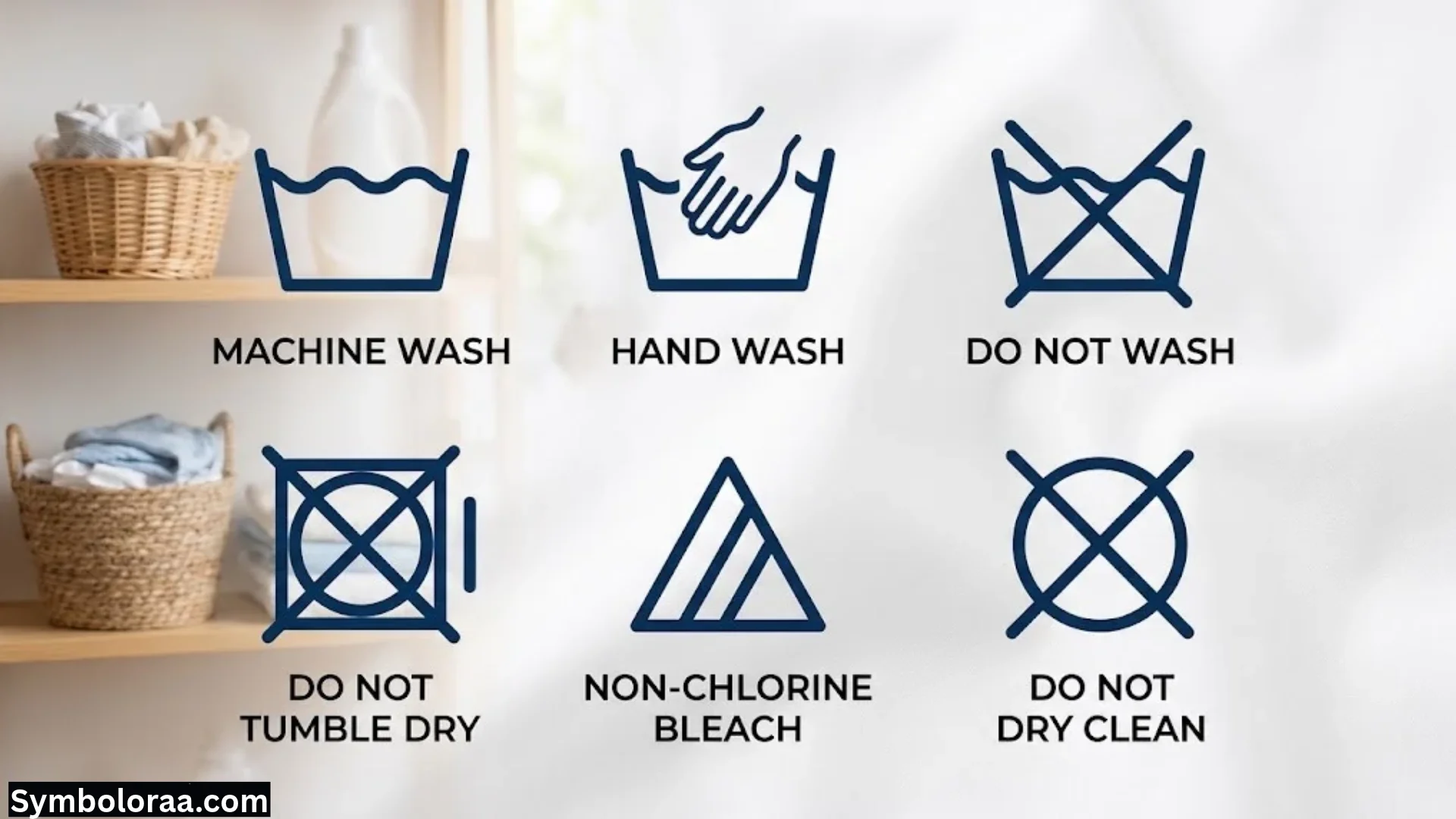
Wash Tub Symbol
The wash tub represents washing with water. Numbers inside the tub may indicate a maximum temperature, while a hand inside it usually means hand washing.
A crossed-out tub generally means the garment shouldn’t be washed in water.
Bleaching Triangle Symbol
The triangle represents bleaching instructions.
A plain triangle may indicate that bleaching is allowed under the applicable care-label system. A crossed-out triangle means you shouldn’t bleach the garment.
Other markings can specify restrictions on chlorine or oxygen bleach. Always check the exact symbol before using a bleaching product.
Drying Square Symbol
The square represents drying instructions. A circle inside the square usually relates to tumble drying.
Dots inside the circle may indicate the permitted heat level. A crossed-out symbol generally means tumble drying isn’t recommended.
Other square-based symbols can describe natural drying methods, such as line drying or drying flat.
Iron Symbol
The iron symbol indicates whether and how a garment can be ironed.
Dots commonly indicate the permitted temperature level. A crossed-out iron means the garment shouldn’t be ironed.
Use the care label to guide the iron setting. Delicate synthetic fabrics may be damaged by excessive heat.
Dry-Cleaning Circle
A circle generally represents professional dry-cleaning instructions. Letters inside the circle provide information for the cleaning professional.
A crossed-out circle usually means the garment shouldn’t be dry-cleaned under the applicable labeling system.
Don’t assume that a dry-cleaning symbol describes a washing machine program. It provides garment-care guidance instead.
Washing Machine Symbols by Brand

Although many manufacturers use similar icons, their control panels aren’t identical. A symbol’s exact function may depend on the machine’s model and features.
Bosch and Siemens Washing Machine Symbols
Bosch and Siemens machines commonly use recognizable program icons and detergent drawer markings. You may see cotton, synthetics, delicate, wool, rinse, spin, and drum-clean options.
Some models also include special indicators for water supply, foam detection, remote control, or maintenance.
Check the model-specific instructions when an icon doesn’t match the general descriptions in this guide.
Samsung Washing Machine Symbols
Samsung machines may include standard wash programs alongside model-specific functions such as Eco, intensive washing, extra rinsing, or smart connectivity.
The available options vary across product ranges. Some models use a digital display to show settings and warning messages.
If an unfamiliar icon appears, check the exact model’s operating instructions before changing the cycle.
LG Washing Machine Symbols
LG washing machines may include programs for cotton, mixed fabrics, delicates, wool, quick washing, and drum cleaning.
Some models offer steam functions, smart connectivity, or additional fabric-care options. Not every LG machine includes all these features.
Use the controls and program names provided for your model rather than relying on another machine’s icon layout.
Whirlpool Washing Machine Symbols
Whirlpool models may display symbols for everyday cycles, fabric types, spin settings, temperature, and extra functions.
Some machines use separate buttons for options that other models place within a program dial.
If the display shows an unfamiliar indicator, identify the model before assuming the symbol represents an error.
Electrolux, AEG, Beko, Haier, Indesit, Hotpoint, and Miele
These manufacturers use combinations of standard laundry icons and brand-specific symbols.
You may find options for delicate washing, wool, quick cycles, extra rinsing, energy-saving programs, and drum maintenance. The available functions depend on the model.
For the most accurate explanation, use the program names and symbols printed on your machine. Avoid applying instructions from a different model unless you’ve confirmed that the controls work the same way.
Washing Machine Warning Symbols and Error Indicators
A warning symbol can help you identify a problem before it affects the wash cycle. Some indicators are routine notifications, while others require troubleshooting.
| Warning Symbol | Possible Meaning | What You Can Check |
| Tap | Water supply issue | Check that the water tap is open and the inlet hose isn’t kinked |
| Drain or filter icon | Drainage problem | Check the permitted drain and filter maintenance steps |
| Lock | Door or child lock | Check whether the door is securely closed or child lock is active |
| Foam indicator | Excessive suds | Review detergent quantity and type |
| Drum-clean reminder | Maintenance needed | Run the recommended cleaning cycle |
| Balance indicator | Uneven load | Redistribute the clothes if the machine allows it |
| Temperature warning | Water may be hot or a temperature-related issue | Follow the display instructions and avoid opening a locked door |
| Error code | Model-specific fault | Look up the exact code in the machine’s instructions |
These indicators are examples, not universal error definitions. A symbol that looks similar across brands may indicate different problems.
What Does the Tap Warning Mean?
A tap warning often appears when the machine has trouble receiving water.
First, check whether the water supply is switched on. Then inspect the inlet hose for visible kinks or compression.
Only clean an inlet filter if the manufacturer’s instructions explain how to do it safely. If the warning persists, the appliance may need professional attention.
What Does a Drain Warning Mean?
A drain warning can indicate that water isn’t leaving the machine as expected.
A blocked drain filter, obstructed hose, or plumbing issue may be responsible. Some machines also display a specific error code.
Switch off and disconnect the appliance before performing any maintenance that requires access to components. Follow the manufacturer’s instructions, and don’t open a filter if hot water could spill out.
What Does a Foam Warning Mean?
Some washing machines detect excessive foam during a cycle.
Too much detergent or an unsuitable detergent type can create excess suds. This may interfere with rinsing and can sometimes trigger a warning.
Use detergent designed for your machine type and follow the recommended dosage. More detergent doesn’t always produce cleaner clothes.
What Does a Door Lock Symbol Mean?
A door-lock symbol usually means the door is locked for safety.
The machine may keep it locked while water remains in the drum, during a high-temperature cycle, or while the drum is still moving.
Wait for the lock indicator to turn off. Never force the door open.
How to Choose the Right Washing Machine Cycle
Choosing the right cycle becomes easier when you consider three things: fabric type, soil level, and the care label.
Use this quick guide as a starting point.
| Laundry Type | Possible Program | Temperature Guidance |
| Everyday cotton T-shirts | Cotton or mixed load | Follow the garment labels |
| Towels | Cotton or suitable hygiene cycle | Use a higher temperature only when permitted |
| Polyester shirts | Synthetics or mixed load | Choose the label-approved setting |
| Delicate lingerie | Delicate cycle or hand washing | Usually needs gentle treatment |
| Machine-washable wool | Wool cycle | Follow the wool garment’s instructions |
| Lightly soiled clothes | Quick wash | Suitable only for compatible small loads |
| Heavily soiled work clothes | Intensive or cotton cycle | Check fabric durability and label limits |
| Bedding | Cotton or bedding program | Consider fabric type and load size |
| Sportswear | Sportswear or synthetics | Follow instructions for technical fabrics |
| Clothes needing another rinse | Rinse program or extra rinse | Use the setting appropriate for the load |
When different items need different care, separate them rather than forcing everything into one cycle.
How to Use Washing Machine Symbols Step by Step
If you’re unsure which settings to choose, follow this simple process.
Check the Garment Care Labels
Look at the care labels before placing clothes in the drum. Separate items that require different temperatures, washing methods, or drying conditions.
Pay special attention to wool, silk, delicate garments, and clothes with special finishes.
Sort the Laundry
Separate whites, dark colors, and bright colors when needed. Group clothes by fabric type and soil level.
Empty pockets and close zippers. Follow garment instructions for turning clothes inside out or using a laundry bag.
Load the Drum Correctly
Avoid packing clothes tightly into the drum. Overloading can reduce cleaning performance and make it harder for the machine to rinse and spin the load properly.
Large items may need more room to move freely. Follow the machine’s load-capacity guidance for the selected program.
Add the Correct Detergent
Use a detergent suitable for your washing machine and the type of laundry.
Place it in the correct drawer compartment. If you use fabric softener, add it only to the designated compartment and respect the maximum fill line.
Select the Wash Program
Choose cotton, synthetics, delicate, wool, quick wash, or another suitable program.
Don’t select a cycle just because it sounds more powerful. A gentle cycle may be the better choice for expensive or easily damaged clothing.
Adjust Temperature and Spin Speed
Set the temperature according to the garment labels and the cleaning task. Choose a suitable spin speed for the fabric.
A higher temperature or faster spin isn’t always better. Protecting the garment matters as much as removing dirt.
Start the Cycle
Close the door securely, select any required options, and press Start.
If a warning appears, read the display and follow the model-specific instructions. Don’t ignore repeated warnings or attempt to bypass safety locks.
Remove Clothes and Maintain the Machine
When the cycle finishes, remove the laundry promptly when practical. Leave the door and detergent drawer open for a while if the manufacturer recommends it and the area is safe.
Clean the drum, drawer, and accessible filters according to the maintenance schedule.
Common Washing Machine Symbol Mistakes to Avoid
A few simple mistakes can lead to poor washing results or unnecessary fabric damage.
- Choosing the hottest temperature by default: High heat can shrink, fade, or damage some garments.
- Using the cotton cycle for everything: Delicate and synthetic fabrics may need gentler treatment.
- Overusing detergent: Excess detergent can leave residue and produce too much foam.
- Confusing the prewash and main-wash compartments: Detergent may be released at the wrong stage.
- Ignoring care labels: The correct machine setting still needs to suit the garment.
- Using a high spin speed on every load: Some fabrics crease or stretch more easily.
- Assuming every brand uses identical symbols: Similar icons can have different functions.
- Ignoring warning indicators: Persistent warnings may point to a supply, drainage, or maintenance issue.
- Overloading the drum: Clothes need enough room to move and rinse properly.
- Using quick wash for heavily soiled laundry: Short cycles may not provide the cleaning needed.
Tips for Saving Energy and Protecting Clothes
You can improve washing results without using the strongest setting for every load.
- Wash full but not overloaded loads when practical.
- Use a suitable eco program for compatible laundry.
- Choose cooler temperatures when they meet the cleaning requirements.
- Measure detergent according to the load, soil level, and product instructions.
- Separate delicate fabrics from heavy items such as towels and jeans.
- Clean the detergent drawer and drum as recommended.
- Use extra rinsing only when it’s needed.
- Follow the care label when selecting temperature and spin speed.
- Maintain the drain filter and other user-serviceable parts according to the manual.
- Treat stains appropriately before washing rather than relying on hotter water alone.
Remember that energy use depends on the machine, program, load, water temperature, and selected options. A cycle that works well for one load may not be suitable for another.
Frequently Asked Questions About Washing Machine Symbols
What Are the Most Common Washing Machine Symbols?
The most common symbols include cotton, synthetics, delicate, wool, quick wash, rinse, spin, drain, temperature, and child lock. Many machines also display detergent drawer markings and warning indicators.
The exact icons vary by manufacturer and model.
What Does the Flower Symbol Mean on a Washing Machine?
The flower symbol usually marks the fabric-softener compartment. Add softener there if you use it, and don’t exceed the maximum fill line.
What Does I and II Mean on a Washing Machine?
The I symbol generally identifies the prewash detergent compartment. The II symbol usually marks the main-wash detergent compartment.
If your drawer uses different markings, check the appliance instructions.
What Does the Spiral Symbol Mean?
A spiral commonly represents the spin cycle. The machine rotates the drum to remove excess water from clothes.
Some machines also use a spiral-like icon to indicate a specific spin-speed option.
What Does the Leaf Symbol Mean?
A leaf often represents an eco or energy-saving program. It may indicate a cycle designed to reduce energy consumption.
The exact function depends on the machine.
What Does the Hand in a Tub Symbol Mean?
On a clothing care label, a hand inside a wash tub usually means the garment should be hand-washed.
It doesn’t necessarily indicate a standard washing machine cycle. If your appliance offers a dedicated hand-wash program, use it only when the garment’s instructions allow it.
What Does a Crossed-Out Tub Mean?
A crossed-out wash tub on a garment care label generally means the item shouldn’t be washed in water.
Follow any additional care instructions, which may recommend professional cleaning.
What Does the Tap Symbol Mean on a Washing Machine?
The tap symbol often indicates a water-supply problem. Check that the water supply is on and the inlet hose isn’t kinked.
If the warning remains, follow the machine’s troubleshooting instructions or contact a qualified technician.
Why Does My Washing Machine Display a Lock Symbol?
The lock may indicate that the door is locked during a cycle or that child lock is enabled.
Wait until the machine releases the door. Check the instructions for the correct child-lock controls if the buttons don’t respond.
Can I Use the Eco Program for Every Load?
No. The eco program can be useful for compatible everyday laundry, but it isn’t automatically the best choice for every fabric or soil level.
Check the care labels and choose a cycle that meets the load’s cleaning needs.
Which Washing Machine Cycle Is Best for Everyday Clothes?
A cotton or mixed-load cycle often works well for everyday clothing, depending on the fabric composition and care labels.
Choose the temperature and spin speed based on the items in the load rather than using the same settings every time.
Why Does My Washing Machine Take Longer Than Expected?
The machine may adjust the estimated time based on load size, water temperature, load balance, and selected options.
An occasional change in the displayed time is normal for many models. If the cycle repeatedly stalls or displays an error, consult the troubleshooting instructions.
Final Thoughts
Learning washing machine symbols and their meanings makes laundry easier and helps you care for your clothes properly. Once you understand the main wash programs, temperature settings, spin options, and detergent drawer markings, choosing a cycle becomes much simpler.
Start by checking the garment care labels. Then select a program that matches the fabric and soil level. Use suitable detergent, avoid overloading the drum, and pay attention to warning indicators.
Most importantly, remember that washing machine symbols aren’t identical across every brand. When an icon is unfamiliar, use the instructions for your exact model instead of guessing. A few minutes spent understanding the controls can help you avoid damaged clothes and get better results from every wash.

I’m Madison Reed, a contemporary American author who writes about love, family, friendship, and second chances. I’m fascinated by the choices that shape our lives and the moments that change us forever. My goal is to create honest, emotional stories with characters readers can connect with long after finishing each book.
Three Books:
When We Find Our Way
The Things We Never Said
Summer in September